Should you take the PMP at a Pearson VUE test center or online with OnVUE? A comparison based on PMI's official rules, step-by-step booking, exam-day checklists, and the mistakes that cost candidates their fee.
Once you've paid your PMP exam fee, you have to choose: take the exam at a Pearson VUE test center or online at home with OnVUE. The choice directly affects your stress and your risk on exam day. This guide compares the two options using PMI's and Pearson VUE's official rules, walks you through booking step by step, and lists the mistakes that cost candidates their fee minutes before the exam.
Quick answer: PMI recommends the test center. Online testing is more convenient but comes with strict computer, network and room rules — if a single requirement isn't met at check-in, you can't test and you lose your fee. If a test center is within reach, choose it.
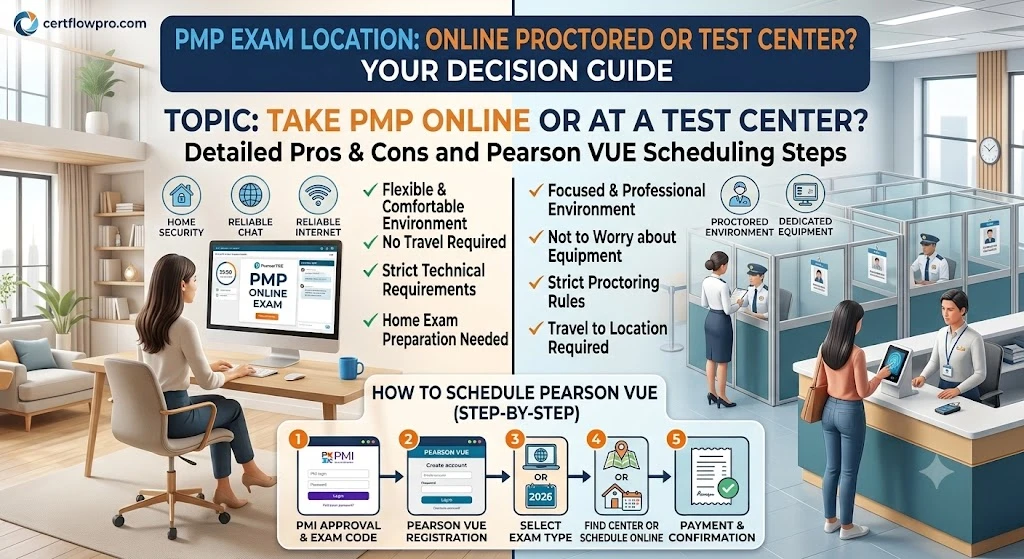
Test center vs online at a glance
Criterion | Pearson VUE test center | Online (OnVUE) |
|---|---|---|
PMI's recommendation | Recommended | Allowed |
Exam, time, breaks | 180 questions, 240 minutes, two 10-minute breaks | Same |
Arrival / check-in | 30 minutes early; late arrivals can't test | Start check-in 30 minutes early |
Computer and network | Provided by the center | Your responsibility; proctors can't troubleshoot your device or network |
Note-taking | Scratch paper and pencils, or erasable boards | On-screen digital whiteboard only |
Calculator | On-screen; handheld available on request | On-screen |
Main risks | Travel, lateness, ID name mismatch | Connection loss, frozen computer, room not compliant, exam revoked for leaving the camera view |
Exam accommodations | Suitable | You may not be eligible to test online |
Which should you choose?
Choose a test center if
You live in or can travel to a city with a Pearson VUE center.
Your home internet is unreliable, or you only have a work laptop (Pearson VUE doesn't recommend employer-issued computers and bans corporate networks and VPNs).
You don't have a closed, quiet room where nobody will come in for about 4.5 hours.
You like working on paper, for example for EVM calculations or network diagrams.
Choose online if
You're far from a test center or its schedule doesn't suit you.
You have a personal computer that meets the requirements, a stable wired connection and a private, quiet room.
You've passed the system test on the exact device and network you'll use on exam day.
How to book the PMP exam with Pearson VUE
Wait for application approval and pay the exam fee. To get the member price, join PMI before you pay (see PMP exam fees 2026).
Get PMI's email with your PMI Eligibility ID and the scheduling link. The link is also in myPMI.
Go to Pearson VUE through PMI's link. If your account isn't found yet, wait: Pearson VUE says eligibility can take up to 24 hours to process.
Choose your delivery method (test center or online) and exam language.
Choose a center and time. Use "Seat Availability" to see which centers offer the PMP — not all of them do.
Confirm and keep the confirmation email. Check the name right away: it must match your ID exactly.
Exam language
The PMP is available in English and 15 translated languages. Choose the right language when you book: PMI can't change the language of an existing appointment, so you'd have to cancel and rebook.
Test center exam day: what to know
Identification
A current, government-issued ID with a photo and signature. Your name must match exactly the name on your scheduling notification — PMI makes no exceptions.
The ID must use Roman characters or include an official English translation. If you test in the country that issued your ID, local-script IDs are accepted.
If your primary ID lacks a photo or signature, you can add a secondary ID.
Check-in
Arrive 30 minutes before your appointment. Late arrivals aren't allowed to test.
Sign in, show your ID and PMI Eligibility ID, have your photo taken and provide a signature.
Security checks: empty your pockets, roll up your sleeves, metal-detector wand.
Personal items go in a locker. You keep only your ID and locker key, and you can't open the locker again until you finish.
You can wear a sweater or jewelry into the room, but you can't take them off once inside — dress for the room temperature.
In the testing room
You'll get scratch paper and two pencils, or two erasable boards with markers — the center decides, not you.
A calculator is built into the exam; you can raise your hand to ask for a handheld one.
The 15-minute tutorial is optional and doesn't count toward the 240 minutes; when it ends, the exam starts automatically.
Every time you leave and re-enter (including breaks), you show your ID and go through security again. The whole session is recorded on audio and video.
Online (OnVUE) exam day: checklist
Computer and network
Windows 10 or macOS 14 or later.
Working webcam, microphone and speakers — no headphones or headsets.
One display only.
At least 6 Mbps download and 2 Mbps upload; use a wired connection if possible.
Not allowed: virtual machines, VPNs, corporate networks, or public or shared networks.
Run the system test in advance on the same device and network you'll use on exam day.
Your room
You must be alone the whole time; nobody may see your screen, even from a distance.
No public spaces such as offices, libraries or coffee shops.
A completely clear desk, except your computer and a drink in an unmarked container.
Remove books, paper and pens, and wipe any whiteboards in the room. You may only use the on-screen digital whiteboard.
Check-in and during the exam
Start check-in 30 minutes before your appointment: technology checks, photos of you and your ID, and a 360° room scan.
If any requirement isn't met, you can't test and you forfeit your fee.
Don't leave the webcam view unless the exam confirms you're on an approved break. Unscheduled breaks get your exam revoked.
After each break, the proctor may ask to see your ID again.
If your computer freezes or disconnects, close and relaunch OnVUE from your downloads folder. Proctors can't pause or extend your exam or fix your device.
Rescheduling, cancelling and no-shows
To reschedule or cancel: log in to PMI.org and choose Reschedule Exam or Cancel Exam; you'll complete it on Pearson VUE. Don't email or call the test center.
More than 30 days ahead: free. Within 30 days: USD 70 plus tax, and you'll need to contact PMI Customer Care. Within 48 hours: you can't reschedule and you forfeit the fee.
Switching between test center and online: cancel your current appointment and choose the new delivery type when you rebook; the fee rules still apply.
No-show or late arrival: you forfeit the fee and must pay in full to book again.
Emergencies (accident, illness): contact PMI within 72 hours of the missed appointment with supporting documents.
After the exam
When you finish a computer-based exam, you receive a preliminary result. It becomes official only when PMI confirms it, no later than 10 business days after your exam date.
Frequently Asked Questions (FAQ)
Should I take the PMP online or at a test center?
PMI recommends a Pearson VUE test center. Online testing is more convenient, but you carry the risk for your computer, network and room; if you fail a check-in requirement, you can't test and you lose your fee.
What do I need to take the PMP online?
A Windows 10 or macOS 14+ computer, webcam, microphone and speakers (no headphones), one display, at least 6 Mbps down and 2 Mbps up, no VPN or corporate network, plus a private room and a clear desk.
Can I use scratch paper in the online PMP exam?
No. You can only use the on-screen digital whiteboard. At a test center you get scratch paper or erasable boards.
Which languages is the PMP available in?
English plus 15 translated languages, including Spanish, French, German, Japanese, Korean and Chinese. Translated exams also let you view each question in English.
What happens if I'm late for the PMP exam?
At a test center, late arrivals can't test, are marked as a no-show and forfeit the fee. Arrive 30 minutes early.
Is there a fee to reschedule the PMP exam?
Free more than 30 days ahead; USD 70 plus tax within 30 days; within 48 hours you can't reschedule and you lose the whole fee.
Try free PMP practice questions →
Official sources: