How to create WBS for software projects: decompose by module, feature, work package — plus Agile/Hybrid WBS vs product backlog explained.
You've just been assigned as PM for a new e-commerce platform project — eight developers, six months, and a kick-off meeting tomorrow. Your sponsor wants a complete WBS. You open a template, and within the first minute the questions pile up: Do we organize by phase or by module? Should backend and frontend sit under one deliverable or two separate branches? Do sprints belong in the WBS?
A WBS for software projects (Work Breakdown Structure) is a hierarchical decomposition of the entire project scope into deliverables — from the top-level product down to work packages that can be estimated, assigned, and tracked. The core rule does not change: cover 100% of scope, and only scope — never list activities. What changes is how you decompose it. Software has invisible deliverables (code, APIs, documentation), interlocking technical layers (frontend, backend, infrastructure), and Agile sprint rhythms that make the WBS harder to structure than a construction or manufacturing project.
This article explains how to build a WBS that fits software project realities, how to adapt it across Predictive, Agile, and Hybrid approaches, and how to recognize WBS questions in the PMP® exam using PMI® mindset.
Key takeaways
WBS decomposes deliverables, not activities — confusing these is the most common mistake
Software projects decompose by product layer (features, modules) or delivery layer (phases) — both are valid if applied consistently
In Agile, WBS does not replace the product backlog — they serve different purposes
In Hybrid, the WBS covers the full project scope; development work is further detailed through the product backlog
A software work package should be small enough to estimate (8–80 hours), assign to one person, and track independently
Why software WBS is harder than it looks
In construction, deliverables are tangible: foundation, walls, roof. Decomposition is relatively straightforward. Software is different — you are decomposing something invisible, and the line between "module," "feature," and "service" is rarely clear.
Three challenges IT PMs commonly face:
Unclear deliverable boundaries. The frontend renders the login form and the backend validates credentials — is this one deliverable or two? Both serve the same user story, but they may be developed by different people with different estimates.
Hidden technical components. API gateway, authentication service, logging infrastructure, and CI/CD pipeline are not user-facing features, but without them there is no product. Omitting these from the WBS violates the 100% rule and leads to underestimated efforts.
Agile sprint cadence vs. a static WBS. Sprint priorities shift every two weeks, while a traditional WBS is treated as fixed. PMs are often unsure whether to maintain both or rely solely on the backlog.
The answer lies in understanding the WBS's purpose: it is a scope management tool, not a project schedule or sprint plan. The WBS answers "what must the project produce?" — not "who does what, and when?"
Principles before you start decomposing
If you need a refresher on WBS fundamentals — the 100% rule, work package definition, and WBS dictionary — the article on WBS fundamentals and the 100% rule covers the foundations. This article adapts those principles for software projects.
Decompose deliverables, not activities.
Wrong (activity) | Correct (deliverable) |
|---|---|
Code the login API | Authentication API |
Hold sprint review meeting | Sprint Review Report |
Write test cases for the reporting module | Test Suite — Reporting Module |
Deploy to staging | Staging Environment |
Stop at the work package level. A work package is the lowest level of the WBS — small enough to estimate, assign, and track. For software, a work package typically equals one to five person-days. Breaking further — individual functions, individual test steps — is task-level activity planning, not WBS.
Apply the 100% rule. The sum of all child WBS elements equals the scope of the parent element — no more, no less. For software, this means testing, documentation, deployment, training, and project management must all appear in the WBS, not just the development work.
Two common decomposition approaches for software
Phase-Based Decomposition
Works best for Predictive projects with clearly separated phases.
Level 1: Project
Level 2: Phases (Requirements, Design, Development, Testing, Deployment)
Level 3: Deliverables within each phase
Level 4: Work packages
Advantage: aligns naturally with timeline milestones and phase gates.
Limitation: cross-phase features get scattered. A Reporting Module has elements in Requirements, Design, Development, and Testing — four separate branches make traceability harder.
Product/Feature-Based Decomposition
Better suited to software's deliverable nature; widely used by IT PMs.
Level 1: Project
Level 2: Major deliverable groups (Product Features, Infrastructure, Quality Assurance, Project Management)
Level 3: Modules or Feature Groups
Level 4: Features
Level 5: Work packages (frontend, backend, tests, documentation)
Advantage: easier to trace from requirements to deliverables; maps naturally to product backlog in Hybrid.
Guidance: for most software projects, deliverable-based decomposition is clearer. Use phase-based only when distinct phases have formal hand-offs between different teams (e.g., a consulting team handles analysis, an in-house team handles development).
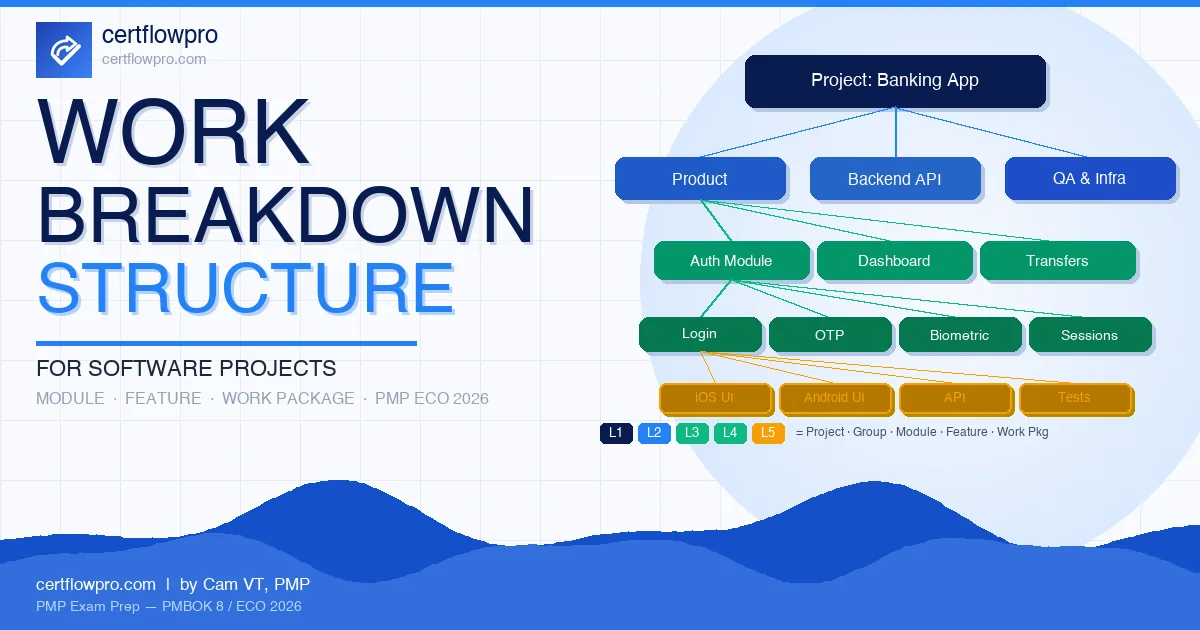
WBS example: Mobile Banking App project
Project: Mobile Banking Application (iOS & Android), 8 months, 12 team members, Predictive approach.
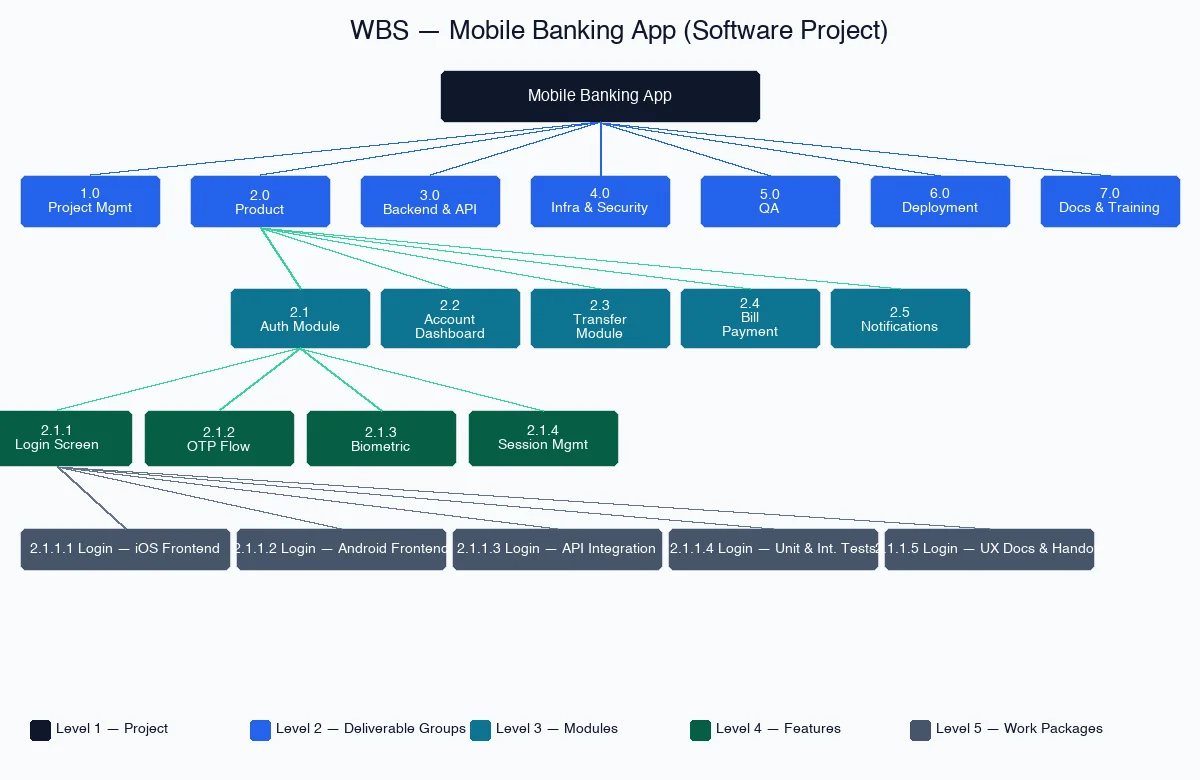
Level 1 — Project: Mobile Banking Application
Level 2 — Deliverable Groups:
Code | Deliverable group |
|---|---|
1.0 | Project Management |
2.0 | Product (Application Features) |
3.0 | Backend & API Services |
4.0 | Infrastructure & Security |
5.0 | Quality Assurance |
6.0 | Deployment & Operations |
7.0 | Documentation & Training |
Level 3 — Modules (expanded from 2.0 Product):
2.1 Authentication Module (login, OTP, biometric)
2.2 Account Dashboard (balance, transaction history)
2.3 Transfer Module (internal transfers, interbank)
2.4 Bill Payment
2.5 Notifications & Alerts
Level 4 — Features (expanded from 2.1 Authentication):
2.1.1 Login Screen (UI/UX)
2.1.2 OTP Verification Flow
2.1.3 Biometric Authentication (Face ID, Fingerprint)
2.1.4 Session Management & Token Refresh
Level 5 — Work Packages (expanded from 2.1.1 Login Screen):
2.1.1.1 Login Screen — iOS frontend implementation
2.1.1.2 Login Screen — Android frontend implementation
2.1.1.3 Login Screen — API integration & validation
2.1.1.4 Login Screen — Unit & integration tests
2.1.1.5 Login Screen — UX documentation & design handoff
Each Level 5 work package can be estimated independently (two to five person-days), assigned to one developer or a pair, and tracked on a sprint board without ambiguity.
WBS across Predictive, Agile, and Hybrid
Aspect | Predictive | Agile (Scrum) | Hybrid |
|---|---|---|---|
WBS role | Backbone of scope management; fully detailed before execution begins | High-level WBS or none; replaced by product backlog for development scope | WBS covers full project scope; development work detailed further through backlog |
Depth | Work package level (Level 4–5) | Level 2–3 (epics, feature groups) | Level 3–4 for non-dev deliverables; Level 2–3 for dev work |
Who creates it | PM with team input (progressive elaboration) | Product Owner + Scrum team (product backlog) | PM creates the WBS; PO owns the backlog |
Handling changes | Integrated change control → update WBS → update scope baseline | Backlog refinement each sprint; scope is inherently flexible | WBS milestones are change-controlled; backlog priorities remain flexible within sprints |
Link to schedule | Work packages → activities → schedule network diagram | User stories → sprint planning → sprint backlog | WBS milestones + sprint cadence |
WBS and product backlog answer different questions — they are not interchangeable:
WBS: "What must the project produce?" — all scope, from start to finish
Product backlog: "What will we build in the next sprint?" — prioritized by value, refined each iteration
In Hybrid, a feature in the WBS (e.g., "2.3 Transfer Module") is elaborated into epics and user stories in the backlog, then pulled into sprints by priority. The WBS ensures no scope is missed; the backlog governs order and timing. This is the most common pattern in enterprise software projects.
Common mistakes and how to avoid them
Mistake | Example | How to avoid it |
|---|---|---|
Listing activities instead of deliverables | "Hold kick-off meeting," "Code the login API," "Review pull request" | Ask: "If we skip this item, is a deliverable missing?" If no → it is an activity, not a WBS element. |
Omitting non-development deliverables | WBS shows only Development; Testing, Documentation, Deployment, and Project Management are missing | Apply the 100% rule: every effort that produces a project deliverable must be in the WBS. |
Too shallow | "Mobile App Development" as a single work package — cannot be estimated or assigned | Decompose until each work package can be estimated in 8–80 hours and assigned to one person or a pair. |
Confusing WBS with a Gantt chart | Adding start dates, end dates, and dependencies to the WBS | WBS has no timeline. After the WBS is complete, convert work packages into activities to build the schedule. |
No WBS dictionary | Work packages have names but no descriptions, acceptance criteria, or owners | For each work package, document: work description, acceptance criteria, responsible party, and a link to the spec or user story. |
PMP exam tips: the PMI mindset on WBS
WBS questions in the PMP exam cluster around three scenarios:
"What should the PM do first?" PMI consistently prioritizes referencing or creating the WBS before estimating costs, assigning resources, or building a schedule. If a question asks about cost or duration estimates, the correct answer almost always starts with the WBS.
"When scope changes, the PM should?" Run the change through integrated change control first. After approval, update the WBS, then update the schedule and cost baselines. This sequence matters: never update the schedule before the WBS.
"Who creates the WBS?" Not the PM alone. PMI emphasizes team participation in decomposition (progressive elaboration). The correct answer is consistently "the PM together with the team and subject matter experts."
Exam tip: When you see a WBS question, ask yourself: "Is this about scope or schedule?" WBS = scope decomposition (what). Activity list, schedule network, Gantt chart = schedule (when, how long). Mixing them up costs points on sequencing questions or "what should be done first?" scenarios.
For a full view of how PMI defines the Develop and Manage Project Scope task in ECO 2026, see the article on Project Scope Management in PMBOK 8.
3 scenario questions
Question 1.
You are the project manager of a software development project. The project scope includes building a mobile banking app with three main modules: Authentication, Account Dashboard, and Fund Transfer. During sprint planning, the development team requests to add a "dark mode" feature to the Authentication module. The product owner agrees it would be valuable.
What should you do FIRST?
A. Add the dark mode feature to the product backlog for the next sprint immediately
B. Evaluate the change request through the integrated change control process and update the WBS if approved
C. Inform the product owner that dark mode is out of scope and cannot be added under any circumstance
D. Ask the development team to implement dark mode in their current sprint since it is a relatively small change
Question 2.
A project manager is creating a WBS for a web application development project using a predictive approach. The team has identified the following items for inclusion in the WBS:
A. "Develop login functionality"
B. "Login Page — Frontend component (UI)"
C. "Login API — Backend endpoint"
D. "Test suite for the login module"
Which item should NOT be included in the WBS because it violates a core WBS principle?
Question 3.
Your company is running a hybrid project to build an ERP system for a manufacturing client. The project manager has created a high-level WBS covering all major deliverables. The development team is using Scrum for the implementation work. The Scrum team argues that they do not need a WBS because they have a product backlog that already captures all the required features.
How should the project manager respond?
A. Remove the WBS and delegate all scope management to the Scrum team's product backlog
B. Explain that the WBS and product backlog serve different purposes: the WBS defines what the entire project must deliver; the backlog details how the development work will be planned and sequenced in sprints
C. Create a detailed WBS that maps directly to every sprint and user story to maintain control
D. Escalate to the project sponsor to mandate that the Scrum team follow a fully predictive WBS process
Answers and explanations
Question 1: Answer B. Any scope change, no matter how small, must go through integrated change control before implementation. After approval, the WBS and scope baseline are updated. Option A (adding directly to the backlog) bypasses change control — common in Agile-only teams but incorrect by PMI mindset. Option C is too rigid: PMI does not prohibit adding scope, only requires going through the process. Option D is the classic scope creep antipattern.
Question 2: Answer A. "Develop login functionality" is an activity — it describes an action, not a deliverable. The WBS contains only deliverables and work packages. Options B, C, and D are all valid deliverables: the login page frontend component, the login API backend endpoint, and the login module test suite can each be estimated, assigned, and accepted. The key test for any WBS item: "Is this something produced, or something done to produce something?"
Question 3: Answer B. WBS and product backlog are complementary, not competing tools. The WBS ensures 100% of project scope is captured — including infrastructure, testing, deployment, training, and project management deliverables that may not appear in the development backlog. The backlog manages the order and timing of implementation within sprints. Option A abandons project-level scope management. Option C creates a rigid WBS that conflicts with backlog refinement and undermines Agile flexibility. Option D escalates unnecessarily.
Want to practice more WBS and scope management questions under timed conditions? Try 10 free PMP questions — no account needed.
Summary
A WBS for software projects follows the same principles as any WBS — decompose deliverables by the 100% rule, stop at work packages that can be estimated and assigned. What makes software different is the need for deliberate effort to capture technical components (APIs, infrastructure, security) and non-development deliverables (testing, documentation, training) — items that are easy to overlook because they are invisible.
In Hybrid — the most common pattern in enterprise software — WBS and product backlog run in parallel: the WBS owns scope, the backlog owns agility. Neither replaces the other.
To understand how PMI® defines the full Develop and Manage Project Scope task in ECO 2026, read Project Scope Management in PMBOK 8. For Agile and Hybrid planning, Adaptive Planning for PMP covers the sprint and release planning layer that sits below the WBS.
Frequently asked questions (FAQ)
What is the difference between a WBS and a product backlog?
A WBS defines what the project must produce, covering 100% of scope from start to finish. A product backlog is a prioritized, incrementally refined list of requirements managed sprint by sprint. In Hybrid projects, the WBS ensures nothing is missed; the backlog manages development sequencing and priorities.
How many levels should a software project WBS have?
Typically four to five levels: Project → Deliverable Groups → Modules → Features → Work Packages. Stop when each work package can be estimated (the 8–80 hours rule of thumb) and assigned to one person or a pair. Decomposing further — individual functions, individual test steps — is activity planning, not WBS.
Should sprints appear in a WBS?
No. Sprints are schedule artifacts, not project deliverables. The WBS captures what is built (modules, features, components); the schedule captures when and at what pace. In Hybrid, sprint cadence is organized in the schedule layer below the WBS work packages — not inside the WBS itself.
Do I need a WBS if my team uses Jira?
Yes. Jira manages tasks and stories at the activity level. The WBS operates at the deliverable level, ensuring 100% scope coverage. Many teams build a high-level WBS in a mind map or spreadsheet, then map it to Jira epics and stories for execution tracking. The WBS remains the scope baseline; Jira is the execution tool.