When stakeholders dispute agreed decisions, PMs need a written confirmation process after every meeting. Templates and 3 PMP scenario questions included.
The dev team finished the sprint. The feature was merged, tested, and ready to demo. Then the review meeting turned tense: the client said, "I never agreed to that requirement." The PM looked around — no written record existed from the meeting two weeks earlier. The sprint had to be redone, the deadline slipped by two weeks, and trust between both sides eroded over a missing email.
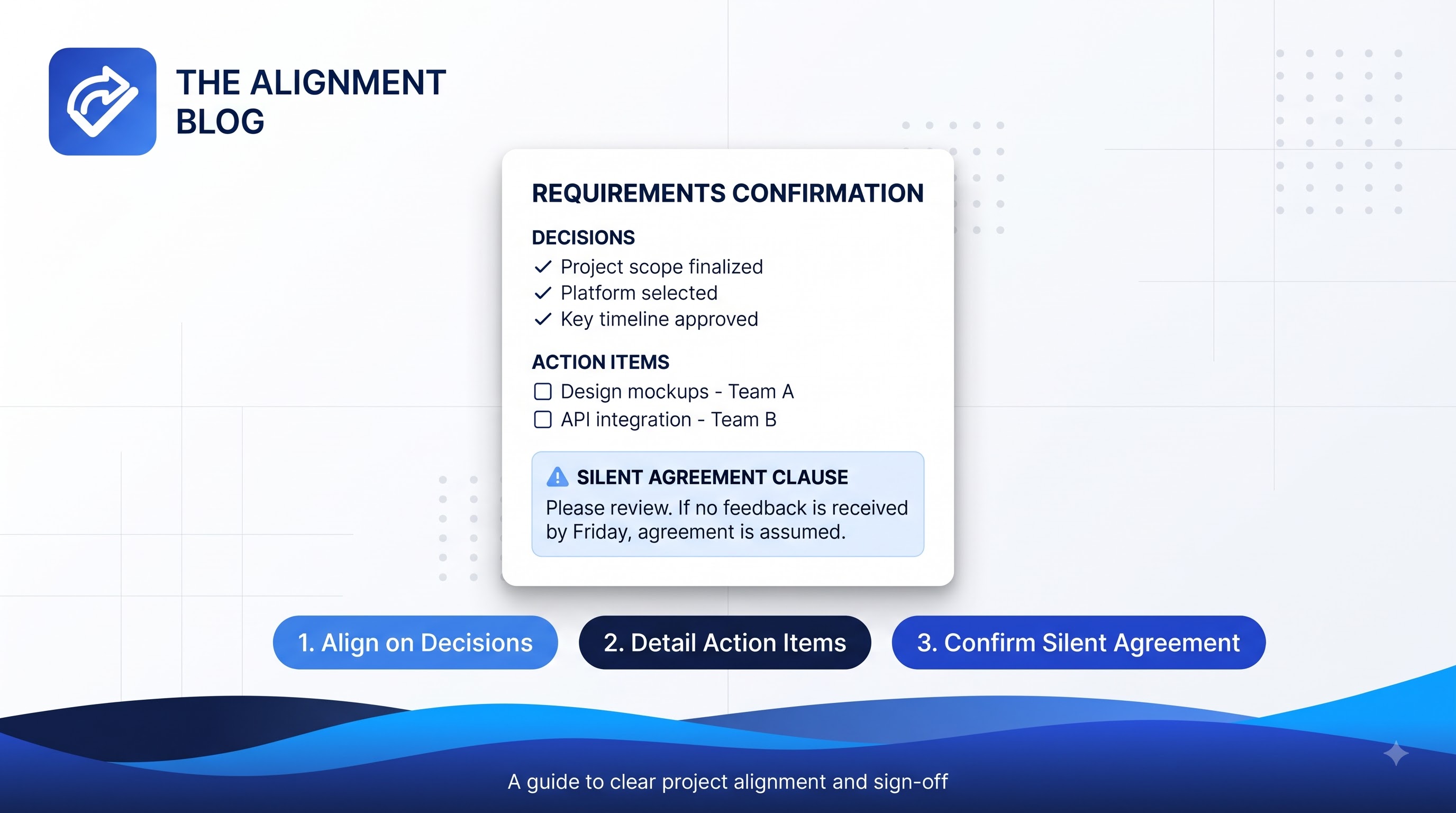
Knowing how to confirm requirements after meeting project management decisions in writing means sending a written summary of decisions and action items within 24 hours, applying a "silence equals consent" rule after 48 hours, and saving that confirmation into your project documentation. These three steps convert a meeting from a shared memory — which every participant remembers differently — into an accountable record. This guide walks through each step with a reusable email template and 3 PMP®-style scenario questions.
Key takeaways:
The PM — not the secretary — owns the responsibility for written requirements confirmation after every meeting.
Four types of requirements need confirmation: scope decisions, action items, priority changes, and acceptance criteria.
The 3-step process: send email within 24h → wait for confirmation or apply silent agreement within 48h → save to project documentation.
The "silent agreement" clause must be stated explicitly in the email, not assumed.
On the PMP® exam, the PM must have documentation before escalating or rejecting a scope change.
Why Requirements Confirmation Is the PM's Job, Not the Secretary's
Many PMs treat post-meeting summaries as administrative work. PMI® sees it differently: the PM owns project documentation and communication effectiveness — both of which directly protect the scope baseline from erosion.
The PMBOK® Guide Eighth Edition defines communication not merely as transmitting information, but as ensuring information is received, understood, and acknowledged. When a decision exists only in participants' memories, it has not entered the project record — it remains a personal recollection until confirmed in writing.
The link to scope creep is direct: most scope creep does not come from stakeholders deliberately adding requirements. It comes from ambiguity about what was actually agreed. An unconfirmed decision is a gap in the scope baseline, and anyone can fill that gap later with their own interpretation. Building a communication management plan that includes post-meeting confirmation is how PMs close that gap systematically.
Four Types of Requirements That Need Written Confirmation
Not everything discussed in a meeting requires formal confirmation — only what affects scope, deliverables, deadlines, or accountability. Four categories consistently require written follow-up:
1. Scope or feature decisions. Any time a stakeholder says "add X," "remove Y," or "change Z to W" in a meeting — even if it sounds minor — that is a scope change and needs written confirmation before the team acts on it. Example: "The system will support PDF export instead of Excel-only as originally specified."
2. Action items with owners and deadlines. Each action item must have exactly one responsible owner and one specific deadline. Example: "Minh will send the API specification to the frontend team by November 15th." Without written confirmation, owners may not remember or may remember the deadline differently.
3. Priority or backlog order changes. In agile environments, the Product Owner frequently adjusts backlog priority during sprint planning or reviews. Each priority change needs written confirmation to prevent the scenario where a team member says "I thought Feature A was still the top priority."
4. Acceptance criteria for deliverables. This is the most critical category and the most common source of disputes. Verbally stated acceptance criteria get filtered through each person's memory. Example: "Page load time must be under 3 seconds on a 4G connection" is a confirmable criterion. "It should be fast" is not.
The 3-Step Process for Confirming Requirements After a Meeting
Both predictive and agile projects benefit from the same approach. The only difference is where you file the confirmed information at step three.
Step 1 — Send a summary email within 24 hours. Send as soon as possible after the meeting, ideally the same business day. The email must clearly list: (a) decisions made, (b) action items with owners and deadlines, (c) any scope changes, and (d) a deadline for stakeholders to respond if they have corrections. Copy all relevant parties — not only the person you spoke with directly.
Step 2 — Apply the "silent agreement" rule after 48 hours. State explicitly in your email: "If I do not hear from you by [date], I will proceed on the basis that the above is accurate." This is not a legal maneuver — it is a clear expectation that gives stakeholders a window to correct misunderstandings before the team acts. If a stakeholder later disputes an agreed requirement, the PM has a documented record of the confirmation process.
Step 3 — File the confirmation in project documentation. The email is evidence, but it is not the final record. Use it to update the formal project documents: the decision log, the requirements traceability matrix (RTM) for predictive projects, or the sprint backlog and definition of done for agile projects. Store the email in your project management information system (PMIS) or the shared project folder.
Step | Action | Timeframe | Where to File |
|---|---|---|---|
1 | Send meeting summary email | Within 24h after meeting | Email thread + project folder |
2 | Wait for response or apply silent agreement | 48h from sending | Email thread |
3 | Update decision log / RTM / sprint backlog | Immediately after confirmation | PMIS / project documentation |
Meeting Requirements Confirmation Email Template
The template below covers the three essential components of an effective confirmation email: summary of decisions, action items with accountability, and the silent agreement clause. Adjust the specifics to your project context, but keep all three sections intact.
Subject: [Project Name] Meeting Summary — [Date] — Action Required by [Deadline]

Hi [Attendees],

Thank you for today's meeting. Below is a summary of the decisions and action items discussed.

DECISIONS MADE:
1. [Decision 1 — specific, not vague]
2. [Decision 2]
3. [Any scope changes agreed upon]

ACTION ITEMS:
- [Owner Name]: [Specific task] by [Date]
- [Owner Name]: [Specific task] by [Date]

ACCEPTANCE CRITERIA CONFIRMED:
- [Deliverable]: [Specific, measurable criterion]

If you have any corrections or additions to the above, please reply by [Date + 2 business days].
If I do not hear from you by that date, I will proceed on the basis that the above is accurate.

Best regards,
[Your name]
[Project Manager, Project Name]
One drafting note: write decisions in affirmative form, not discussion form. Instead of "We discussed adding PDF export" → write "The team agreed to add PDF export functionality to Sprint 4 scope." This distinction determines whether the email holds up as a record when disputed.
Common Mistakes When Confirming Requirements
Most PMs know they should send a post-meeting email. The problems arise in execution:
Mistake | Consequence | Fix |
|---|---|---|
Sending the email without a reply deadline | Stakeholders can dispute the record at any time | Always include "Reply by [date]" in the confirmation email |
Missing relevant parties on CC | Key stakeholders claim they were not informed | CC all parties with a stake in the decision — not only your direct contact |
Using vague language ("we discussed X") | Unclear whether the team decided or merely discussed | Write "the team agreed to X" or "it was decided that X" |
Not filing the email in project documentation | Record is lost or hard to retrieve months later | Forward to PMIS or project folder immediately after sending |
Not re-confirming when scope changes | Small changes accumulate into uncontrolled scope creep | Send a fresh confirmation email for every scope change, however minor |
In agile projects, the most common mistake is treating sprint backlog updates as a substitute for stakeholder confirmation. The sprint backlog is a technical document for the team. The confirmation email is a communication with stakeholders. They serve different purposes and neither replaces the other.
PMP Exam Tip: Written Confirmation and Integrated Change Control
A common PMP® scenario question presents a stakeholder disputing an agreed requirement, and asks what the PM should do. The correct PMI® answer is not to escalate immediately or refuse the change outright — it is to reference project documentation to establish what was agreed, then process any change through integrated change control if needed.
PMI treats written confirmation as an accountability tool — a mechanism that ensures everyone knows their responsibilities — not a blame tool. When stakeholders receive a clear confirmation email, they have the opportunity to correct misunderstandings before the team acts, rather than discovering the gap after the work is done.
This connects directly to integrated change control: every scope change — including those verbally agreed in a meeting — must go through the formal change control process to be incorporated into the baseline. The confirmation email is the documented starting point of that process.
Practice more scenario questions like these at CertFlow PRO — free, no registration required.
3 Scenario Questions
Each item below mimics the PMP® exam format: a realistic project situation, four answer choices, and an explanation tied to PMI principles.
Question 1.
A software development team completed a sprint based on requirements agreed upon in a planning meeting two weeks ago. During the demo, the client states: "I never agreed to that requirement." The PM has no written record of the meeting. What should the PM do FIRST?
A. Escalate the issue to the project sponsor immediately.
B. Ask the team to redo the work to match the client's current expectations.
C. Document the client's current position and initiate the change control process to assess the impact.
D. Remind the client verbally what was discussed in the meeting and proceed with the original plan.
Answer: C. Without written confirmation of the original requirement, the PM cannot dispute the client's position based on memory alone. The correct PMI action is to document the client's current view and assess the impact through integrated change control before deciding on a path forward. Option A escalates before assessing impact. Option B redoes the work without going through change control. Option D relies on verbal recollection, which is not a project record.
Question 2.
During an active sprint, the Product Owner tells the development team directly: "I need you to change the acceptance criteria for the login feature — it should now support biometric authentication." The Scrum Master was not present. No change was documented. What is the BEST action for the PM?
A. Implement the change immediately since it came from the Product Owner.
B. Refuse the change because it was not requested through the formal change control process.
C. Facilitate a discussion with the PO and team to assess the impact, document the agreed change, and update the sprint backlog and acceptance criteria accordingly.
D. Wait until the sprint retrospective to address the issue.
Answer: C. In agile environments, the PO has authority to adjust acceptance criteria, but a mid-sprint change needs impact assessment and formal documentation. The PM must ensure the team agrees, the sprint backlog is updated, and written confirmation is obtained from the PO. Option A implements without assessing impact, risking the sprint commitment. Option B applies a rigid predictive approach to an agile context. Option D delays resolution long enough to affect sprint outcome.
Question 3.
A hybrid project team holds a requirements meeting over video call with stakeholders in three different time zones. No one takes notes during the call, and the meeting recording is unavailable due to a technical issue. After the call, team members have different understandings of a key requirement. What should the PM do to prevent this from happening in future meetings?
A. Require all stakeholders to attend future meetings in person.
B. Establish a process where the PM sends a written summary of decisions and action items within 24 hours of each meeting, with a 48-hour window for stakeholders to raise objections.
C. Assign a dedicated note-taker from the client side to attend all future meetings.
D. Record all future meetings and share the recording as the official record.
Answer: B. A PM-owned process for sending a written summary within 24 hours — combined with a defined window for objections — creates a consistent, PM-controlled mechanism for requirements confirmation that does not depend on recordings or client-side note-takers. Option A is not feasible for distributed teams. Option C shifts accountability to the client side. Option D makes recordings the official record, which is not searchable, may raise privacy concerns, and is not a recognized project documentation format under PMI standards.
Summary
Post-meeting requirements confirmation is a risk management practice, not an administrative chore. A 24-hour email, a 48-hour silent agreement window, and consistent filing in project documentation — these three steps take under 15 minutes and can prevent an entire sprint from being redone over a disputed memory.
If you do not have this process in place, start with your next meeting. No special tools required — just a clear email and the discipline to send it consistently.
Related reading: How to Write Effective Meeting Minutes for Project Managers and Project Scope Management: Scope Statement, WBS and Scope Control.
Frequently Asked Questions
How long after a meeting should the PM send a confirmation email?
Within 24 business hours — ideally the same day. The longer you wait, the more details fade from everyone's memory and the less accurate the confirmation will be. For meetings that end late in the day, sending the email the following morning is acceptable.
What to do when a stakeholder disputes a confirmed requirement?
Reference the confirmation email sent previously and acknowledge the stakeholder's current position in writing. Do not reject the change outright — process it through integrated change control to assess the impact on scope, timeline, and budget. If the change is approved, update the baseline and send a new confirmation email.
Is email confirmation enough, or is a formal sign-off needed?
It depends on project risk level and contractual requirements. For minor internal decisions, email confirmation is sufficient. For acceptance criteria on major deliverables or large scope changes in contracted projects, a formal sign-off is required — a signed document or approval through the PMIS. The PM should define this threshold in the communication management plan at project start.
References
Project Management Institute. (2026). PMP® Examination Content Outline – July 2026. PMI. pmi.org
Project Management Institute. (2025). A Guide to the Project Management Body of Knowledge (PMBOK® Guide) – Eighth Edition. PMI. pmi.org
Related articles on CertFlow PRO Blog: Scope Management PMBOK 8, Aligning Stakeholder Expectations.